


How to Install Khelosports on Android & iOS
Why Download the Khelosports App?
Khelosports APK download enhances the fun instantly. This provides a boost to the overall experience of users. The application version enhances the speed of playing. Also, it offers a smoother and more convenient experience. The app removes all the delay issues that happen with browsers. Additionally, no need for repeated logins. Here is why users prefer the app version over the website.
Fast Access
In just a single hit, the application and fun begin. Additionally, the application keeps track of activities. Thus, users can reopen their play from the same spot. Further, the app does not take much time to open like browsers. So, users instantly explore the platform and start playing.
Quick Notifications
Sports activities are a favourite on our site. However, such activities take time to finish. Now with the help of quick notifications, there is no need to wait. When the result arrives, the user gets notified. Additionally, they get instant notifications of bonuses and tournaments. Thus, nothing gets missed.
One-Tap Payment
Mobile banking is now common among users. The app version let users connect wallets easily. Thus, users can transact more comfortably. With just one tap, the payment process. This includes both deposits and withdrawals. Overall, no issues while managing the balances.
Khelosports App at a Glance
Our application stands out for its speed and responsible design. It is lightweight and supports almost all devices. Here is a quick snapshot of what the app offers.
| Category | Details |
|---|---|
| Application Name | Khelosports App |
| Current Version | 1.0 |
| Supported Platforms | Android & iOS |
| Minimum Android OS | 5.0 and above |
| Minimum iOS OS | 12.0 and above |
| App Size | Approximately 10 MB |
| Free Space Needed | At least 50 MB |
| Khelosports App Update Method | Manual |
| Payment Processing | Fast and secure |
| Customer Support | Available 24/7 |
The Khelosports app requirements are very low. Thus, users on different devices can use it. So, check compatibility and download for better access to the platform.
Getting the APK on Android
Many Android users are members of our community. Such users can follow the guide below. This will help them to download the Khelosports Android app on their device.
- Firstly, open the main page of the platform.
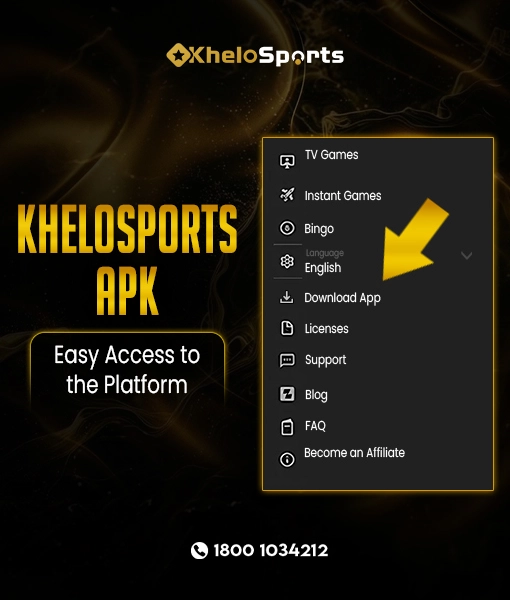
- Next, scroll down to the bottom. Here, click on “Download App.”
- Afterwards, a pop-up will appear. Hit it and open the download page.
- Following that, press the download button. By this save the APK file to your phone.
- Further, open the phone’s file manager. Here, look for the Khelosports file.
- Finally, tap on it to install. Grant any permissions if required.
Note: Check the Khelosports app in the app menu.
Overall, the process of Android installation is simple.
Setting It Up on iPhone or iPad
For iOS users, the method is identical. Just grab your iOS device and execute the steps below:
Firstly, open the Safari browser.
Afterwards, visit the website.
Following that, open the “Download App” section.
Further, click Download to save the file.
Finally, open the file and install the app.
Note: Add the Khelosports iOS app to the home. This helps you to launch it quickly when needed.
Is There a Khelosports App for PC?
There is no official PC application available. However, the web version is available for such devices. PC users can simply visit the site. Afterwards, they can enjoy all activities.
First-Time Setup After Installing
Now, the app is there on your device. However, to use it, you need to set up the profile. Here is how to carry out this process.
Registration Steps
Users who do not have a profile must register first. It is easy to do so. Here is how:
- Firstly, click on the app icon
- Afterwards, press the “Register” button. This will open the sign-up page.
- Further, add your email and number
- Then, set a new username. Similarly, set a password.
- Following that, use the OTP to verify.
- Finally, click on “Register” to finish.
This is how you can register on the app. After registration, the app will ask you to log in, which we will cover next.
Login Steps
Once registered, logging in is straightforward:
- Open the app and click on “Login”.
- A login page will appear. In the top field, add your username, email, or phone number.
- Add your password in the next box.
- Click on “Login” to finish.
- Alternatively, click on the mobile icon to log in using OTP.
Thus, logging in is quick and offers flexibility based on user preference.
Keeping Your Khelosports App Updated
We keep the experience always relevant by providing updates to the application. Users are advised to update on time. This reduces bugs and enhances performance.
How Khelosports app updates roll out:
- A message is displayed for a new version.
- Users can visit the website to check updates.
Steps to update manually:
- Firstly, open the website and explore the Khelosports download app page.
- Next, check if a new version is available.
- Click to download the latest APK file.
- Then, install it from saved files.
Installation Troubleshooting
For some phones, installation may not go as expected. If such issues arise, here are some common problems and their solutions.
- App Not Installed – Look for storage. Also, allow “Install from Unknown Sources”.
- App Keeps Crashing – Users can clear the cache data. Also, try reinstalling the application.
- Login Not Working – Double-check your credentials. Alternatively, use “Forgot Password”.
- OTP Not Received – Ensure the correct number. Also, check your network connection and request the OTP again.
- App Not Showing After Install – Restart your phone.
If things do not work, users can reach out to support. For this visit, go to the account section and contact support. There are many channels. Thus, pick one and explain the issue.
Official Khelosports App Download
The Khelosports app is designed for users who want quick and secure access. It removes the need for browsers and keeps everything within reach. It just takes one tap to unlock fun. Additionally, users can restart ongoing sessions. Further, it provides quick updates and helps manage payments easily.
The version is lightweight and built to support many devices. However, download only from the official Khelosports website to ensure safety. Unofficial APK sources may contain harmful files. Stick to the official site for the best experience.
Get the app today and enjoy the difference.
Khelosports App Download FAQs
Browse more help topics on the FAQ page.